·
Zendesk features
·
7 minutes

Joakim Tuuli
Solution Consultant
Article summary
Zendesk is retiring its old bot solutions (such as the Answer Bot and Essential Bot) entirely by December 2026. At the same time, Zendesk is merging its AI offering and making its previously paid, advanced AI-agent technology (the New AI Agents Experience) available to all customers without a separate licence threshold. This change forces companies to rebuild their bots, but it also removes the barriers to AI development. In this article we go through the retirement timelines, the technical changes and the practical steps for carrying out the migration.
Zendesk’s legacy bots are being retired
Zendesk has announced that it will wind down its old legacy bot solutions during 2026. At the same time, the earlier split between Zendesk’s Essential- and Advanced-tier AI agents disappears entirely.
What does this change mean for existing Zendesk customers, why does the migration have to be done, and how does it happen in practice? This article digs into it in more depth.
Critical deadlines: when do the old bots stop working?
Zendesk is winding down the legacy bots in two phases. The timeline is tight, and it’s worth reacting to right away:
31 August 2026 — development ends: Legacy bots and the earlier AI Agents – Essential move into maintenance mode. No new features will be developed for them, and only critical security and bug fixes will be released.
December 2026 — final removal: The old bot features are removed from Zendesk’s product portfolio entirely. After this, legacy bots stop responding to customers.
How do I know whether I have a bot that’s being retired?
Before starting the migration, you need to find out which bot solution your company currently uses. You can check the situation in the Zendesk Admin Center:
AI Agents – Essential:
In the Admin Center sidebar, click the AI icon and select AI agents > AI agents.
Under the Essential heading, click the AI agent you want in order to open its settings.
Check the available tabs. An Essential-tier AI agent does not have Topics or Answers tabs.

Legacy Bot:
In the Admin Center sidebar, click the AI icon and select AI agents > AI agents.
Under the Legacy heading, click the AI agent you want in order to open its settings.
Check the available tabs. Old legacy bots have an Answers tab and possibly also a Topics tab.

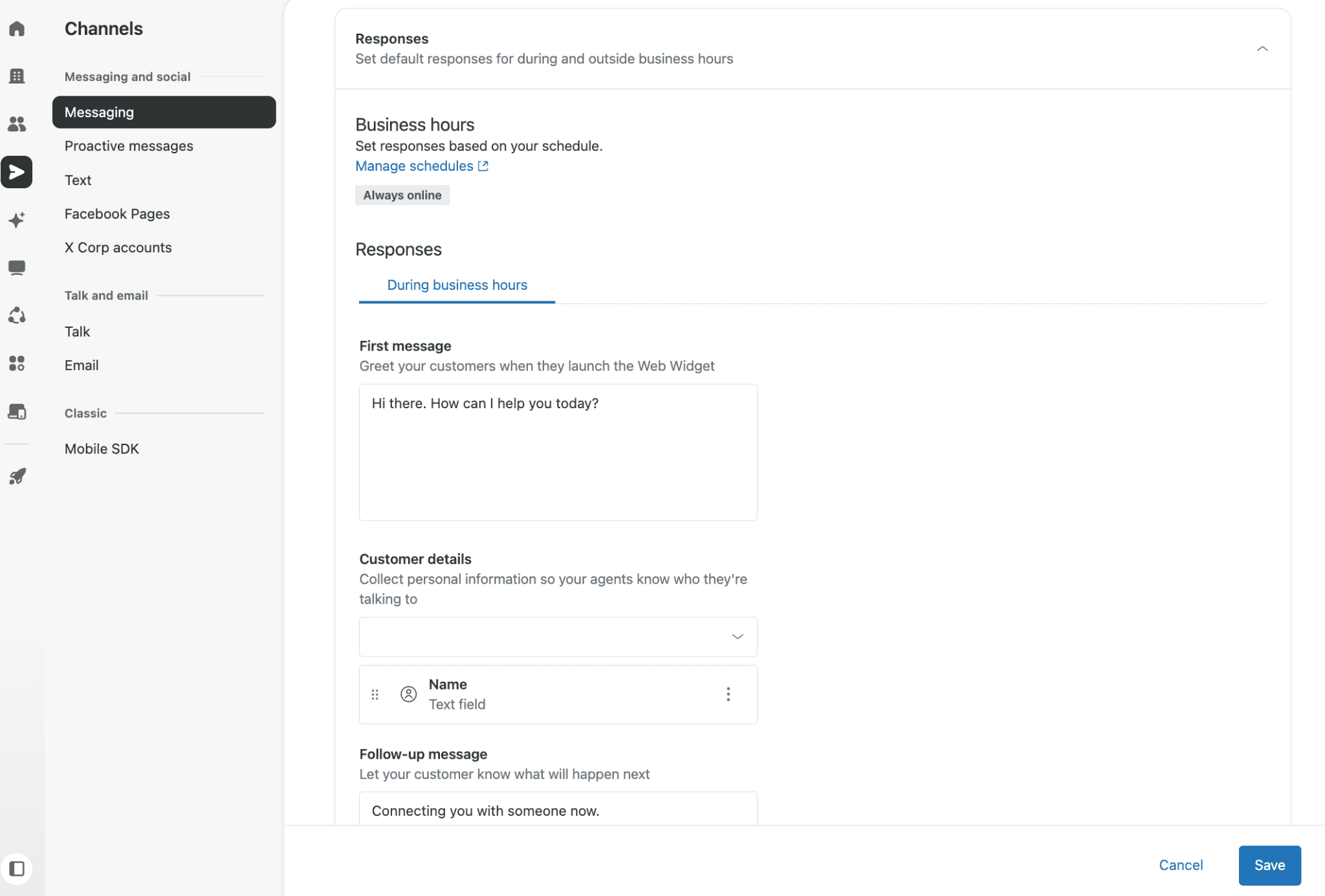
Default messaging responses:
In the Admin Center sidebar, click the Channels icon and select Messaging and social > Messaging.
Select the Brand you want in order to open its settings.
Click the Responses section to expand it. Default responses show two sections: Business hours and Responses.
What changes in the new AI Agent environment?
The biggest change is that the new AI agent uses independent generative reasoning to create its answers. While the earlier Essential-tier AI agent could already answer directly from Help Center articles, it had significant limitations in tailoring conversations, in multi-step paths and in integrations with back-end systems. In the rule-based Flow Builder, meanwhile, the admin had to anticipate every phrasing a customer might use and hand-draw complex, static conversation paths.
The new AI agent available to everyone (formerly the Advanced AI Agent), by contrast, reads and understands your Help Center articles (or another equivalent knowledge base) and, based on them, creates fluent, on-brand answers tailored to the situation for customers’ free-form questions.
Other significant benefits include:
A better resolution rate: The AI agent understands the reason for the customer’s contact and can combine several different questions from the same message (e.g. return terms and delivery times), answering them all clearly at once.
Concrete actions and integrations: The AI agent doesn’t just offer links or text — it can perform real actions in back-end systems (such as checking an order’s status or triggering a return in an ERP system) via APIs.
No separate licence threshold for features: Because the split between Essential and Advanced tiers disappears, all customers from the Suite and Support tiers upward get access to intelligent AI agents. You only pay for the resolutions actually delivered (Automated Resolutions).
Zennius and Ultimate DNA: Zennius has an exceptionally strong vantage point on this development. Our founders have years of background straight from Ultimate’s ranks before the Zendesk acquisition. So we know Zendesk’s current AI agents like the back of our hand, because they’re largely based on technology originally built by Ultimate.
How is the migration done in practice?
Here are the key migration paths for the different bot types:
Migrating an AI Agents – Essential bot
Essential bots are purely generative bots that answer based on Help Center articles but lack broader customisation options and integrations.
Action: Create a new AI agent and connect it to the Knowledge base you want.
A channel limitation to note: If your old Essential bot answered on both email and Messaging, you now have to split it into two separate agents — one for each.
Migrating legacy bots
If you previously created an AI agent that uses the old visual-scripting structures, you can move the same functionality into the new AI Agent environment.
The list below shows how legacy concepts map to the new AI Agent experience:
Bot builder → Dialogue builder — the interface where you create scripted conversation paths that define how your AI agent responds to customers.
Answers → Dialogues — what scripted conversation paths are called.
Intents → Use cases — the mechanism by which the AI agent understands what the customer is asking and connects them to the right conversation path.
Recreate your old bot in the new environment by following the steps presented later in this article. Before you begin, it can be useful to list all your current Answers (Intents) and contact reasons so you can more easily create the corresponding Use Cases in the new environment.
To support building dialogues, the list below shows how the old Bot Builder step types map to the new Dialogue Builder block types:
Send message → AI agent message
Present options → Customer message
Show help center articles → Generative replies
Add carousel → Carousel
Ask for details → AI agent message that presents a form template
Ask if question resolved → Customer message that asks if the question was resolved
Make API call → API integration
Transfer to agent → Escalation
Branch by condition → Conditional
Add business hours condition → Availability
Link to another answer → Link to
Set variable → Any block type with an added action that sets a conversation parameter
Replacing Default Messaging Responses
If you previously used the automatic welcome greetings or business-hours notices found in Zendesk’s basic settings, without an actual bot:
Action: Create a simple new AI agent whose only job is to collect the customer’s basic details and route the ticket immediately to a human agent in the Agent Workspace.
Rolling out the new AI agent step by step
Rolling out the new AI agent differs from the traditional rule-based setup. The process consists of six key steps:
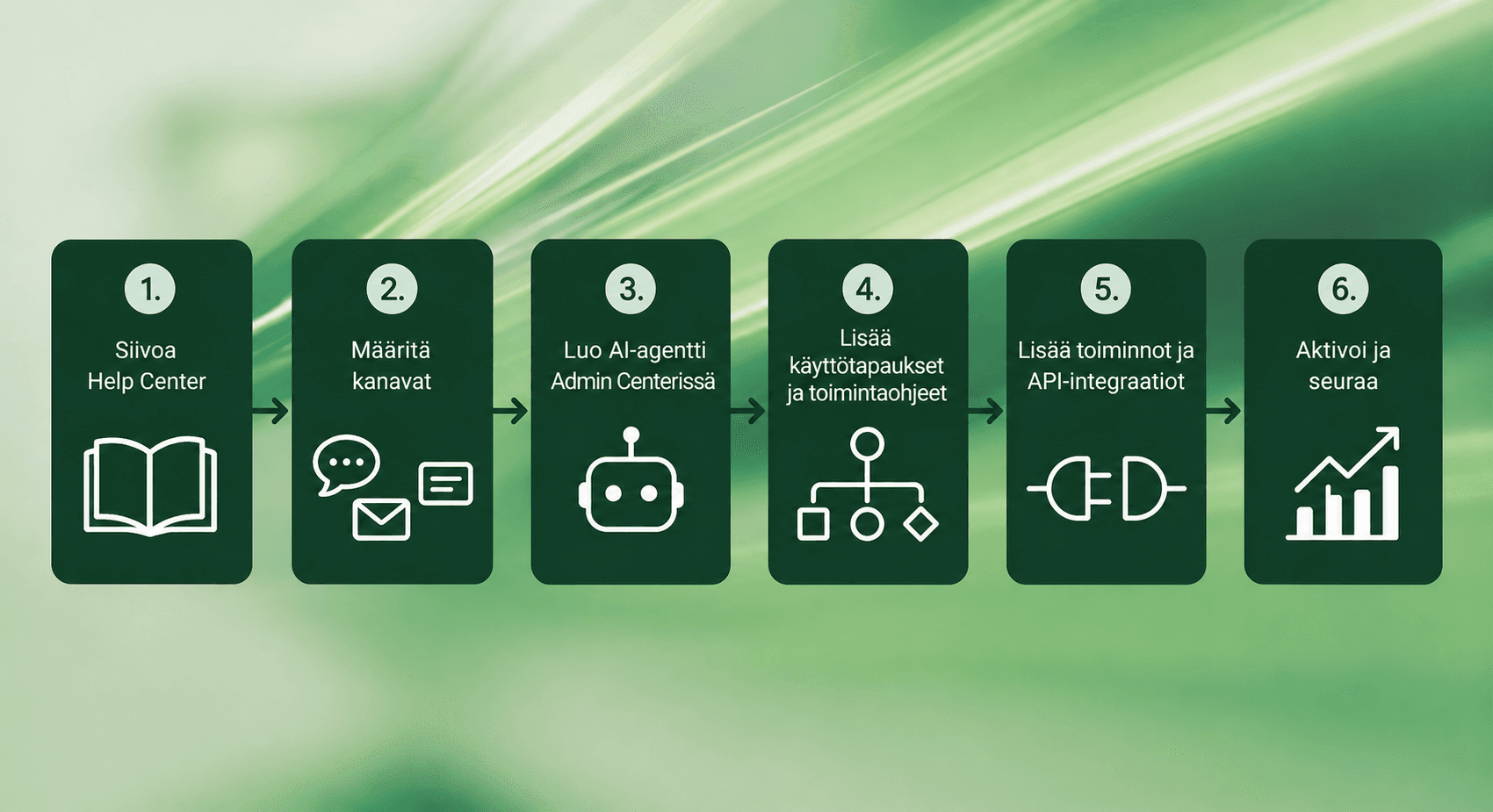
Clean up the Help Center: An AI agent is only as good as the material it’s fed. Fix outdated information in the Help Center, remove contradictions and reshape the instructions into an AI-ready form.
Configure channels: Choose the channels (such as Web Widget, email or WhatsApp) where you want the AI agent to work and answer customers.
Create the AI agent in the Admin Center: Activate and create the AI agent in Zendesk’s settings, connect it to the knowledge base and give it a suitable persona and response language.
Add use cases and procedures (optional): Define the use cases where the AI agent may answer more freely based on the procedures you give it, and when it uses more tightly on-topic conversation paths (Dialogues).
Add actions and API integrations (optional): Connect the AI agent to back-end systems (e.g. CRM or ERP) so it can read or change data via APIs.
Activate and monitor: Publish the AI agent (we recommend testing in a Sandbox environment first) and monitor its resolution rate and hand-offs to humans from the analytics.
Zendesk’s bot history: how did we get here?
For interested readers, here’s a short look at why Zendesk’s bot architecture is changing and how we got to this point:
2014 – Zopim acquisition: Zendesk bought the popular live-chat tool that became the legacy Zendesk Chat. It ran as its own separate platform for a long time.
2018 – Answer Bot v1: The first Answer Bot suggested three help articles based on keywords at the start of a chat or email. If the customer didn’t get help, the matter went to a human.
2018 – Smooch and Sunshine Conversations: The Smooch acquisition brought powerful social-media APIs (Sunshine Conversations), the Switchboard architecture and the ability to plug third-party bots into Zendesk.
2021 – Zendesk Messaging and Flow Builder: Legacy chats were replaced by the modern Messaging widget, and the visual Flow Builder was released to make building answers easier.
2024 – Ultimate acquisition: Zendesk bought the market-leading AI platform, Ultimate. This brought into Zendesk’s core the ability to do zero-shot reasoning, procedural integrations and generative answers.
2026 – The present: Zendesk is further strengthening its AI agents through the Forethought acquisition, simplifying its AI-agent product and removing the differences between the “Essential” and “Advanced” AI versions. All customers get access to the same powerful, agentic AI.
Next steps: how to move forward?
This migration is an excellent opportunity to bring your company’s customer service up to date all at once. But don’t leave the transition to the last minute — autumn 2026 comes around fast, and designing, building and testing a working AI agent takes care.
Zennius is an AI-expert-certified partner. With experience from over 100 Zendesk AI rollouts, we know these features below the surface and make sure you get the best possible return on your investment.
Would you like to spar on how to move your current legacy bots into the new environment safely and without downtime? Book a meeting here and let’s design a future-proof customer service platform for you.
Frequently asked questions
Zendesk's legacy bots are being retired in two phases. On August 31, 2026, legacy bots and the former AI Agents – Essential move into maintenance mode, meaning no new features are developed and only critical security and bug fixes are released. In December 2026, the old bot features are removed entirely and stop responding to customers.
You can identify a bot that is being retired in Zendesk's Admin Center under AI > AI agents. An Essential-tier AI agent has neither a Topics nor an Answers tab, whereas an old legacy bot has an Answers tab and possibly also Topics. Default responses can be found under Channels > Messaging and social > Messaging, in the Responses section of the brand you select.
The new AI agent uses independent generative reasoning: it reads your Help Center articles and creates on-brand answers to free-form questions based on them. It can also handle several questions in the same message, such as return policies and delivery times, and carry out real actions in back-end systems, for example starting a return in an ERP system.
The old bot doesn't migrate automatically: in both cases, a new AI agent is created from scratch. For an Essential bot, the new AI agent is connected to the desired Knowledge base. A legacy bot's logic is rebuilt, and the old concepts map to the new ones as follows: Bot builder is now Dialogue builder, Answers are dialogues, and Intents are use cases. One AI agent serves only one channel type.
The new AI agent doesn't cost more than the old bot, and it doesn't require a separate license for features. The split between Essential and Advanced tiers is going away, so all customers from Suite and Support plans upward get the same AI agents. You pay only for Automated Resolutions, so the cost follows the benefit you get.