·
Zendesk features
·
7 minutes

Joakim Tuuli
Solution Consultant

Article summary
This article covers everything essential about custom integrations for Zendesk's AI agent — it answers, in short, what they are, why you'd build one, and how. We walk through what an integration means in practice, why it's worth building one, and how to build it in three different ways.
An AI agent that can only read Help Center articles handles generic questions well, but not topics that involve customer-specific data. For example, “how do I cancel an order” is generic, but “where’s my refund” requires knowing that specific customer’s refund — and with an integration connected to the back-end system, the agent can fetch it.
Integrations give the AI agent exactly that: a connection to your own or an external system, so it can access real-time data and take action on your behalf. In practice, an integration is always set up in the context of a use case: it’s attached to that use case’s procedure or dialogue, so the AI agent knows to fetch or update data at the right point in the conversation.
If use cases and procedures aren’t familiar yet, it’s worth reading our guide to rolling out Zendesk AI agents first.
Get your AI agent’s knowledge base right first
Before you build a single integration, it’s worth pausing on one question: is your AI agent’s knowledge base in good shape? Zendesk’s AI agent is always built on top of its knowledge base — it retrieves and interprets answers primarily from the Help Center or other sources via a RAG architecture.
For most organizations, the biggest low-hanging fruit isn’t building a new integration or use case — it’s cleaning up and formatting the knowledge base to be AI-ready.
We’ve covered this in more detail in How do you make your knowledge base AI-ready? — worth reading first if your knowledge base still needs work.
Once the knowledge base is producing reliable answers, it’s time to think about what else the AI agent should integrate with, beyond the Help Center.
What is an integration, and why build one?
An integration is a connection between the AI agent and a company’s own or external back-end system (e.g. a CRM or order management system). When the AI agent can access real-time, customer-specific data, it can check things and perform actions. Two things happen at once:
Your automation rate goes up, because the agent can resolve the customer’s issue end-to-end without human involvement — which in turn improves the whole platform’s ROI.
The agent feels more human, because it responds to that specific customer’s situation by fetching and updating real data.
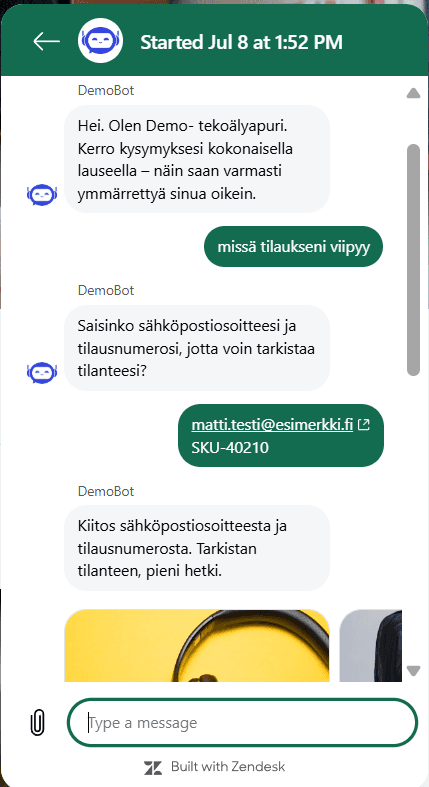
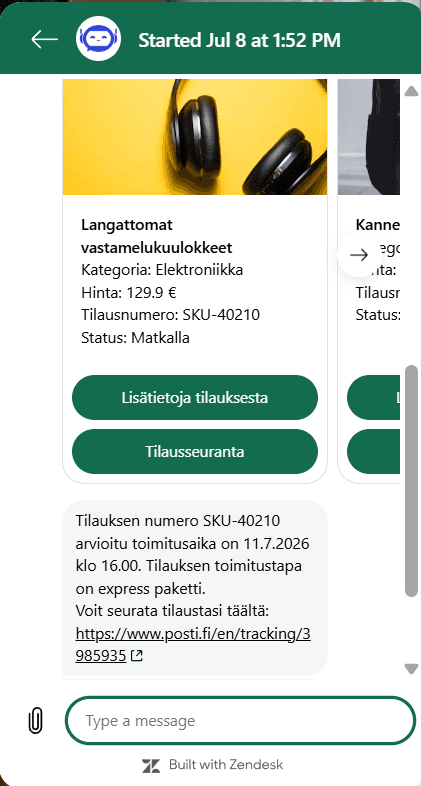
Example: Fetching order details with a dynamic carousel
The customer asks in chat: “Where’s my order?”
The AI agent extracts the customer’s email address and sends it as an API call to the back-end system.
The system returns the customer’s order history, which the agent presents as a visual carousel directly in the chat window.
When the customer clicks the order they want in the carousel, the AI agent fetches the real-time status and gives it to the customer.
Three ways to build an integration for your AI agent
In Zendesk today, you can build an integration in three different ways. Some are built in the AI agents tab, others in Admin Center. Let’s walk through them practically, so you can see where each one fits and how they relate to each other.
1. AI agents tab: Integration builder (API integrations)
This is the original no-code tool, built specifically for the AI agent. You’ll find it under Actions > API integrations in the AI agents tab.
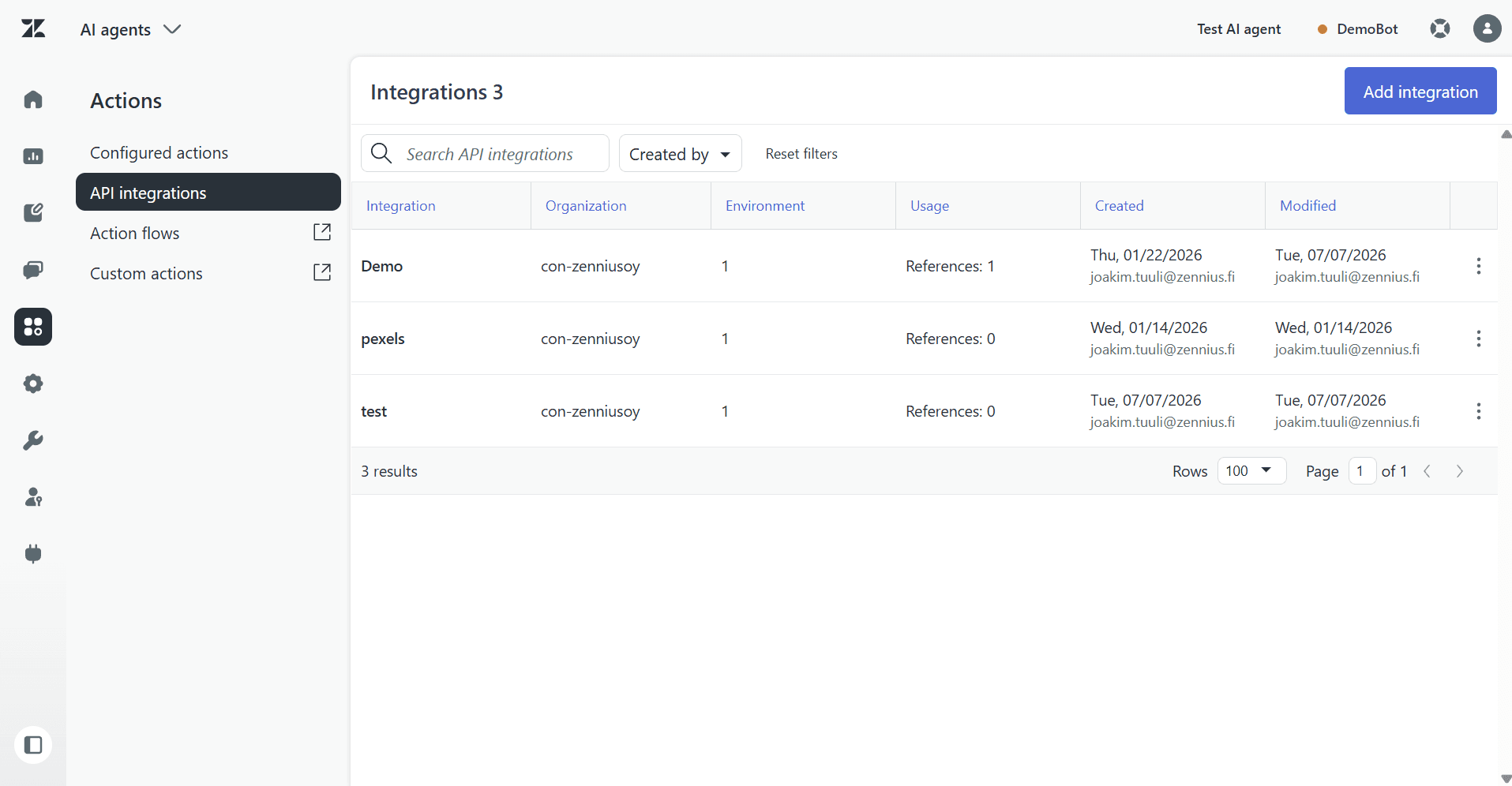
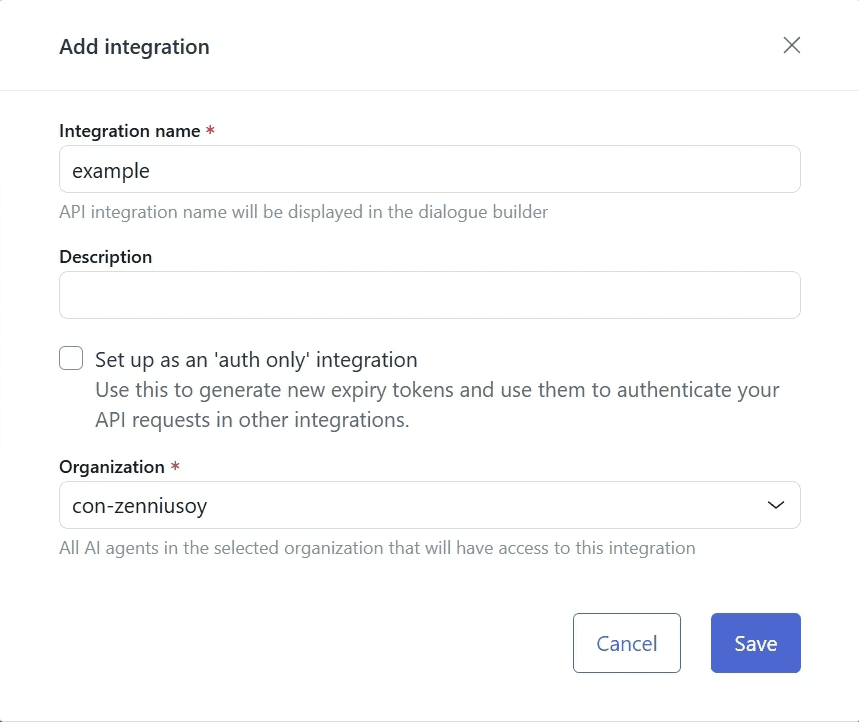
The integration is built step by step:
Name and description: give the integration a name and description.
Request parameters: define what data from the conversation — e.g. the customer’s email or order number — gets passed to the API.
Environment: choose the method, URL, authorization type, headers, and any required body. You can create multiple environments for the same integration (e.g. sandbox and production).
Scenarios (Success, Failure, Fallback): determine which conversation branch the agent moves to, based on the API’s response (statusCode and data).
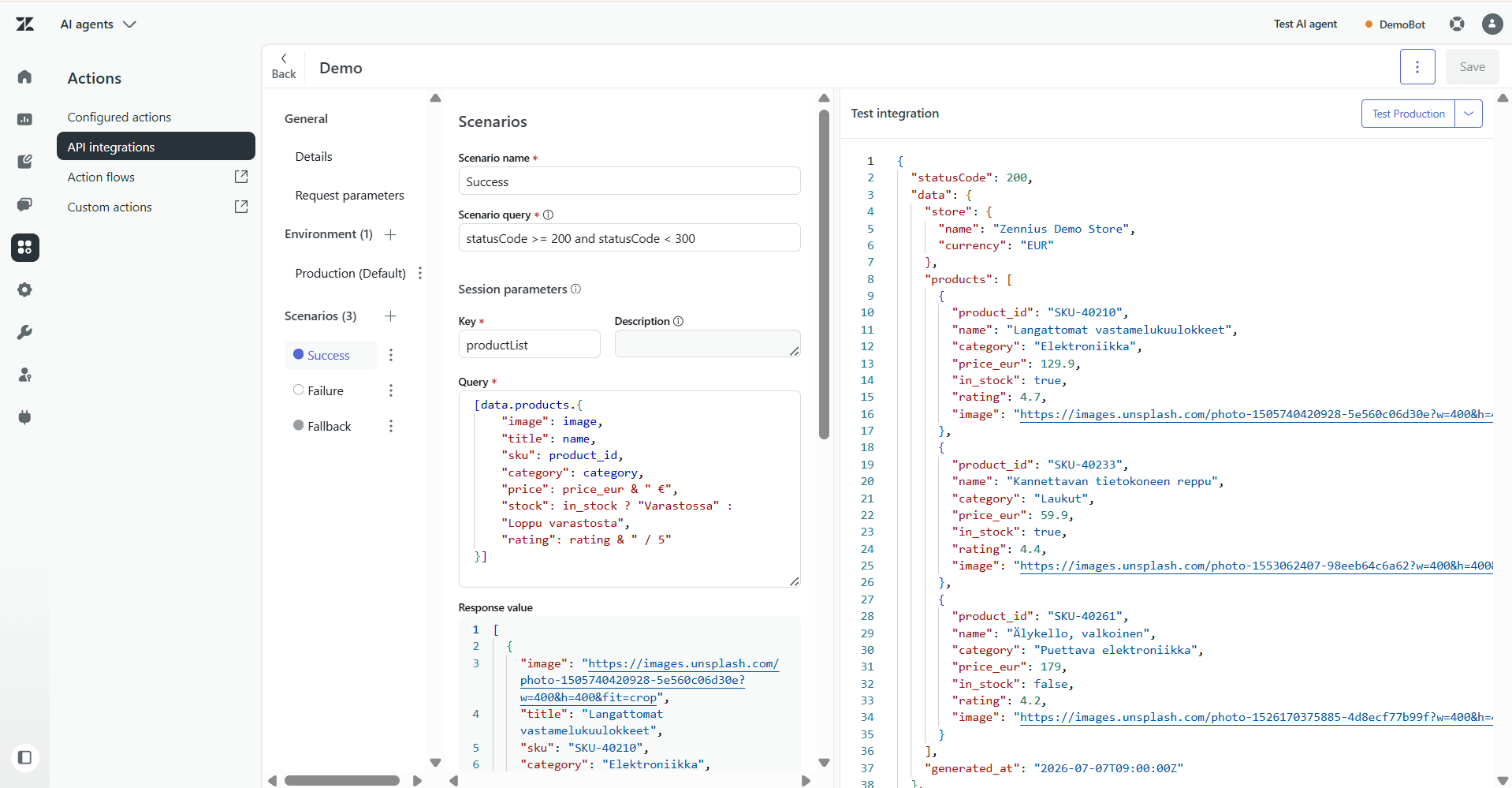
Two features make this tool especially usable for non-technical users too:
The JSONata query language: APIs often return raw data, like dates in the format
2026-06-15T14:38:05Z. JSONata lets you clean up and format that data (e.g. turning it into15.6.2026) directly in the scenario’s session parameters, with no code needed in the back-end system.Sandbox testing: APIs can be tested and refined safely in a dedicated test environment before going to production, right from Integration builder’s Test function.
Zendesk’s architecture makes sure API keys or other security-critical credentials are never sent to the customer’s browser: all authenticated calls run directly between Zendesk’s servers and the back-end system (server-to-server).
2. Admin Center: Custom actions
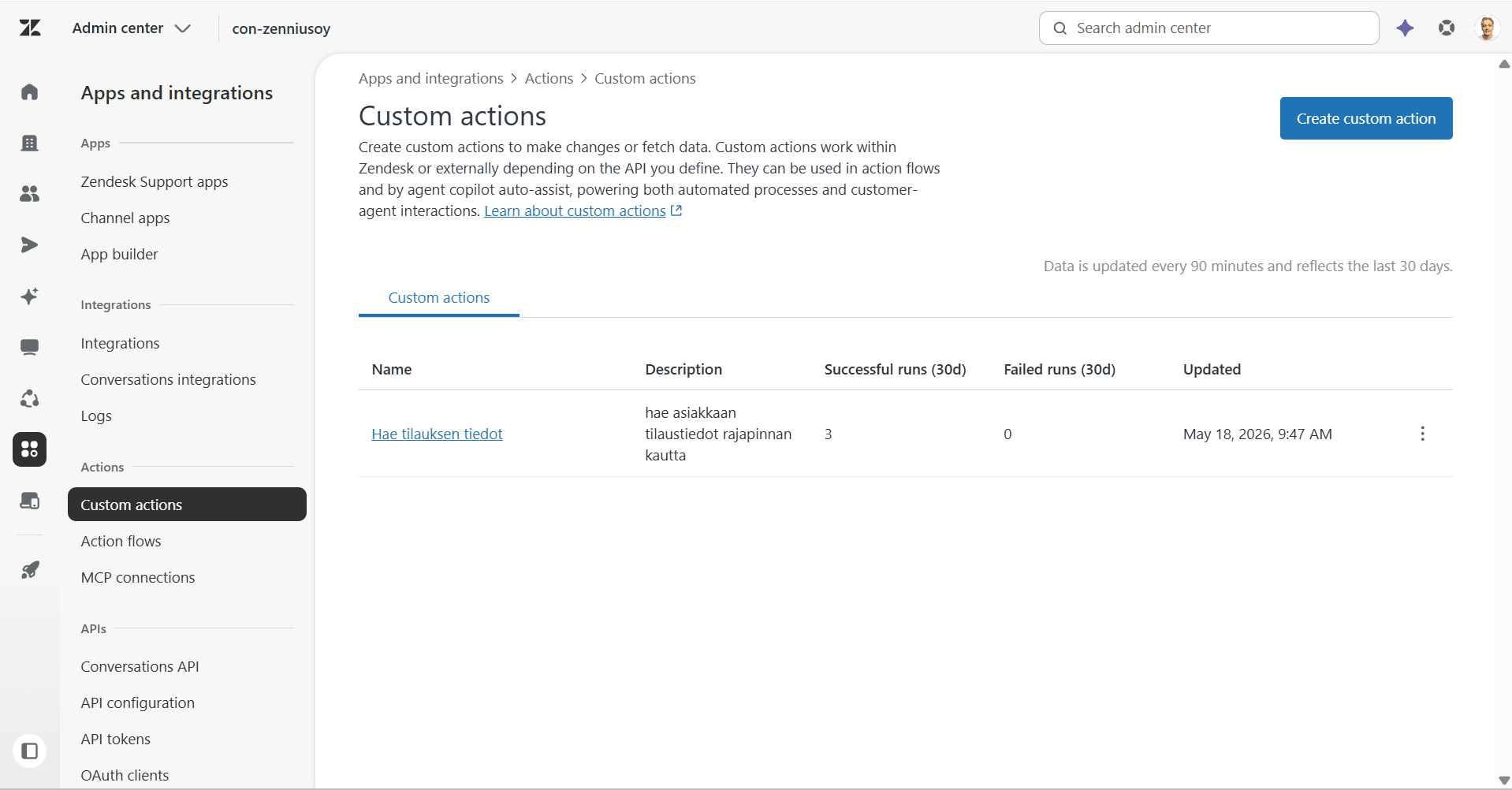
Custom actions are built in Zendesk’s Admin Center (Apps and integrations > Actions > Custom actions > Create custom action), and can be used by auto assist (Agent Copilot), the AI agent, and action flows alike — the same action works in all three.
A custom action works on the same principle as Integration builder above, and is made up of three parts:
Name and description: give the action a name and description.
Inputs: the data the action needs to run (e.g. an order number). Each input becomes a placeholder you can insert into the URL, body, query parameters, or headers.
API call: method (GET/POST/PATCH/PUT/DELETE), endpoint URL (https only), and authentication. Authentication always goes through an existing connection — credentials are never entered directly into the action itself.
Outputs: which parts of the API response get captured and passed back to auto assist, the AI agent, or the next step.
3. Admin Center: Action flows
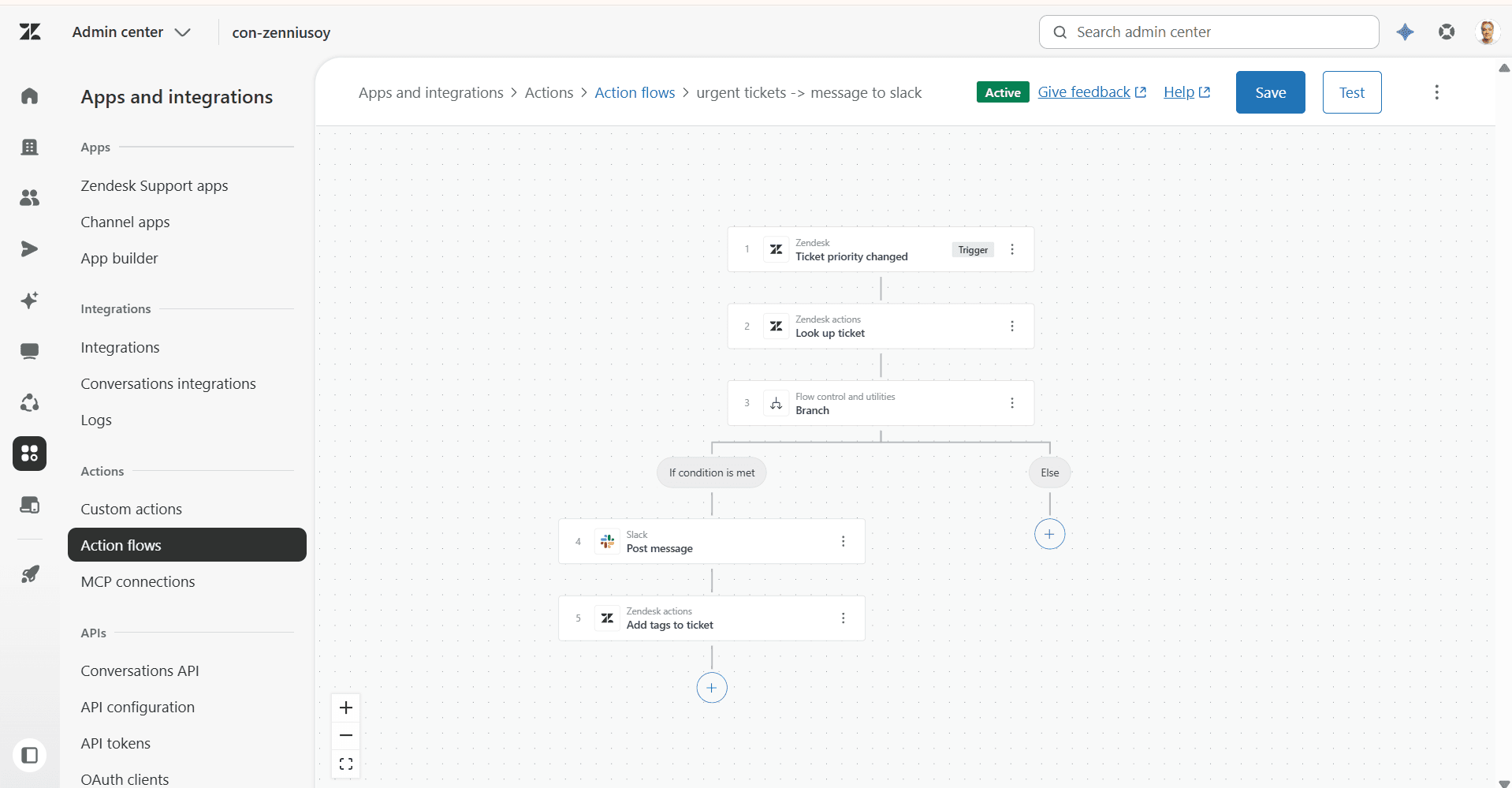
An action flow is a user-defined automated workflow: a trigger followed by a series of steps.
Triggers: ticket and user events, custom object events, Slack events, a scheduled trigger, or Run on demand — the only trigger that the AI agent and auto assist can call directly, mid-conversation.
Step types:
Zendesk actions: built-in actions on tickets, users, organizations, and custom objects (e.g. adding a tag, editing a ticket, creating a user).
External actions: ready-made connections to dozens of systems, such as Jira, Slack, Salesforce, Shopify, Google Workspace, Microsoft 365, Confluence, and Notion.
Custom actions: the same custom actions built for auto assist can be dropped straight into an action flow as a step.
Flow control steps: branch (if/else logic), loop steps, updating variables, and a custom code step for your own JavaScript logic.
When an action flow is built with the Run on demand trigger, it becomes available for the AI agent to use in its use cases.
New action flows are inactive by default — you need to activate them separately once you’ve tested them.
Why there are three different ways to build integrations
Until now, the AI agent could only use Integration builder integrations built in the AI agents tab. Custom actions and action flows were previously reserved for human agents (auto assist) and back-end processes.
Zendesk opened up that boundary in spring 2026: the AI agent can now also call custom actions (all of them) and action flows built in Admin Center directly, as long as the flow’s trigger is “Run on demand”.
When an integration is built in Admin Center (as a custom action or action flow), both the AI agent and Agent Copilot (auto assist) can use it at the same time — without building the same connection twice. We recommend this direction ourselves: while Integration builder can still be used to build API integrations for the AI agent, new integrations going forward are better built as action flows.
If the integration’s need is clearly limited to AI agent scenarios only, Integration builder still works well — especially thanks to its JSONata formatting and visual interface.
Need help building custom integrations?
To recap: before you build any integrations, make sure your AI agent’s knowledge base is solid, since integrations only solve what pure knowledge can’t. Once the knowledge base is in good shape, an integration gets attached to a use case’s procedure or dialogue, and you choose how to build it — Integration builder, Custom actions, or Action flows — based on whether it’ll serve the AI agent alone or the human agents’ day-to-day work too. All three are visual, click-based builders, so the barrier to getting started is low — but it’s still worth thinking carefully about which approach fits.
Zennius is an AI Expert-certified Zendesk partner, and our team has experience from more than 100 Zendesk AI rollouts. We’re happy to help you design and build a customer service platform that keeps meeting your customers’ needs going forward. Book a short call directly from our calendar.
Frequently asked questions
An integration is a connection between the AI agent and a back-end system. The back-end system can be the company's own or a purchased service, such as a CRM, an e-commerce platform, or an order management system. When the AI agent can access real-time, customer-specific data, the automation rate rises, because the customer's issue can be resolved end to end without human intervention, and the platform's ROI improves.
Building an integration doesn't require coding skills. All three ways of building one in Zendesk are visual and click-based. Integration builder offers the JSONata query language, which lets you clean up raw data returned by an API, for example from 2026-06-15T14:38:05Z to June 15, 2026, without code. You can also test APIs safely in your own sandbox environment before moving them to production.
There are three ways to build an integration in Zendesk. Integration builder on the AI agents tab (Actions > API integrations) is a low-code tool made for the AI agent. Custom actions in Admin Center work for the AI agent, Agent Copilot, and action flows alike. Action flows in Admin Center are multi-step workflows that the AI agent can call with a Run on demand trigger.
The best way is to build new integrations as action flows in Admin Center, because then both the AI agent and Agent Copilot can use the same connection without duplicate work. If the need is clearly limited to AI agent scenarios, Integration builder on the AI agents tab still works well thanks to its JSONata formatting and visual interface.
API keys are safe. Zendesk's architecture ensures that API keys and other security-critical credentials are never sent to the customer's browser. All authenticated calls go directly between Zendesk's servers and the back-end systems (server-to-server). In custom actions, authentication always happens through a pre-configured connection, never entered directly into the action.