·
Zendesk features
·
7 minutes
·
Updated

Joakim Tuuli
Solution Consultant

Article summary
Zendesk Agent Copilot is a proactive AI assistant built into the service agent's Agent Workspace. Where AI agents handle routine queries end to end, Agent Copilot guides the human agent through more complex cases with suggested replies, writing tools and back-end system integrations. It pays to roll it out gradually rather than forcing it on the whole team at once. Some features, such as ticket summaries, writing tools and merge suggestions, are included in Suite and Support Professional plans within a limited monthly allowance, while Auto Assist and the use of triage classifications in workflows require the Copilot add-on.
Which one to choose — an AI agent or Agent Copilot?
Most of a support agent’s day is spent on two kinds of situations: repetitive routine questions, or complex problems where the agent has to dig up information across different systems and follow multi-step instructions. AI helps resolve tickets in both cases, but in different ways:
Zendesk AI agents: These handle the customer interaction from start to finish without a human (so-called one-touch tickets). They’re a great fit for high-volume routines such as order tracking, password resets or common FAQs.
Zendesk Agent Copilot: This is designed for situations that call for human judgement, empathy or complex problem-solving (so-called multi-touch tickets). Agent Copilot doesn’t talk to the customer directly — it works in the background inside the agent’s workspace: it pulls the information together, suggests a reply and guides the agent step by step through the right process.
Rule of thumb: If a ticket only needs a single API lookup or a straightforward answer, let a Zendesk AI agent handle it. If it needs judgement, several messages back and forth, or manual clicking around back-end systems, turn it into a Procedure for Agent Copilot.
Thanks to this division of labour, agents can focus on the actual customer interaction while AI handles the manual investigation and clicking in the background. But what exactly does Zendesk Agent Copilot include, and how does it make an agent’s day easier?
What Zendesk Agent Copilot includes and how it works
Zendesk Agent Copilot works directly in the Agent Workspace, supporting agents in real time. Its capabilities fall into four main areas:
Intelligent triage
Before a single agent even sees a new ticket, AI analyses its content in the background.
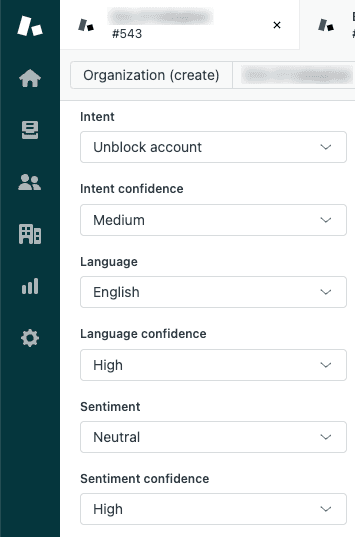
Topic: Automatically identifies what the contact is about. Zendesk used to call this the intent.
Entities: Extracts the key details from the message — such as order numbers, email addresses or products — and can attach them straight to the ticket’s data fields.
Sentiment and language: Detects the customer’s mood (e.g. angry) and the language they’re using.
What’s the benefit of intelligent triage? Manual tagging becomes a thing of the past. Tickets can be routed automatically to the right experts or prioritised by language and sentiment. If it’s a simple one-touch query, an autonomous AI agent can handle it directly, while harder cases reach the agent pre-chewed.
Auto Assist
Once a ticket lands with an agent, Auto Assist steps in with real-time guidance and automation:
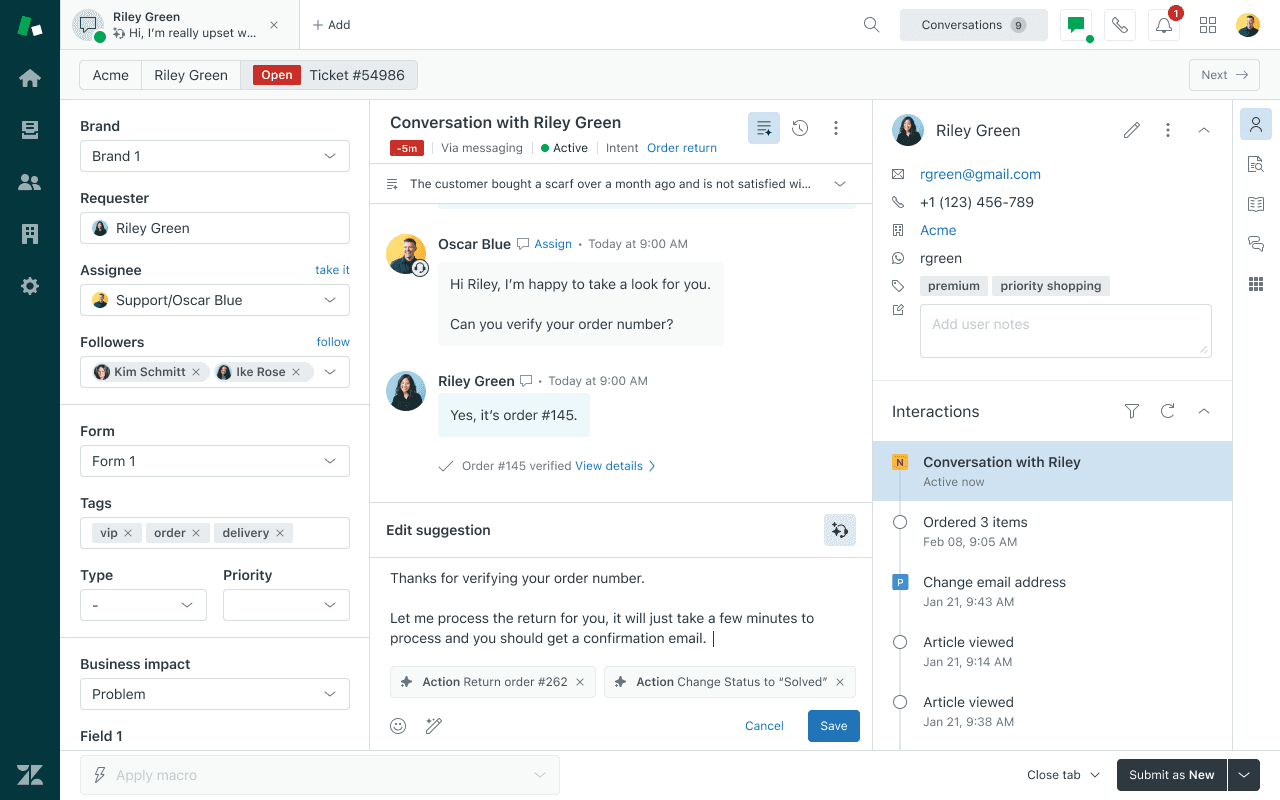
Procedures: Agent Copilot suggests step-by-step procedures based on instructions written in plain language. It understands how the conversation is progressing and guides the agent on what to ask or do next. If the customer already gave their order number in the first message, Agent Copilot recognises it and won’t ask the agent to request it again.
Actions: Auto Assist can run system actions directly from within the ticket, with the agent’s approval (Action Flows). For example, it can issue a refund in an e-commerce or billing system (such as Shopify or Stripe) or fetch customer data from an external CRM with a single click.
Suggested Replies: Generates ready-made drafts based on Help Center articles, macros and previously proven answers.
This makes an AI-ready knowledge base a critical foundation — if the Help Center content is out of date, Agent Copilot’s suggestions can be wrong too. Read here how to build an AI-ready knowledge base.
What’s the benefit of Auto Assist? Agents no longer have to jump between systems in the middle of writing a chat or email. Procedures standardise service quality and are especially helpful in getting new hires up to speed faster. Integrations and suggested replies cut out needless typing and clicking, which noticeably shortens handling times.
Other agent-facing assistance
These work independently of Auto Assist, so they show up in the agent’s workspace even when no procedures have been set up.
Ticket Summaries: Turns long conversation threads into a quick summary so the agent can get up to speed in seconds without reading the whole history. Especially handy when a ticket is handed from one agent to another.
Enhance writing: Helps the agent adjust the tone of a reply, expand short notes into a full email, or simplify text into clear instructions on the fly.
Similar Tickets: Finds and surfaces comparable past resolutions so the agent can reuse answers that already worked.
Merge Suggestions: Surfaces the same requester’s other open tickets from the past 14 days in the ticket’s Related tickets panel and suggests merging them. The feature was switched on by default at the end of August 2026 and is managed in Admin Center.
Analytics
Measurement and continuous optimisation decide whether you actually get value out of Zendesk Agent Copilot. Zendesk provides a ready-made Agent Productivity Dashboard for this, measuring three key areas:
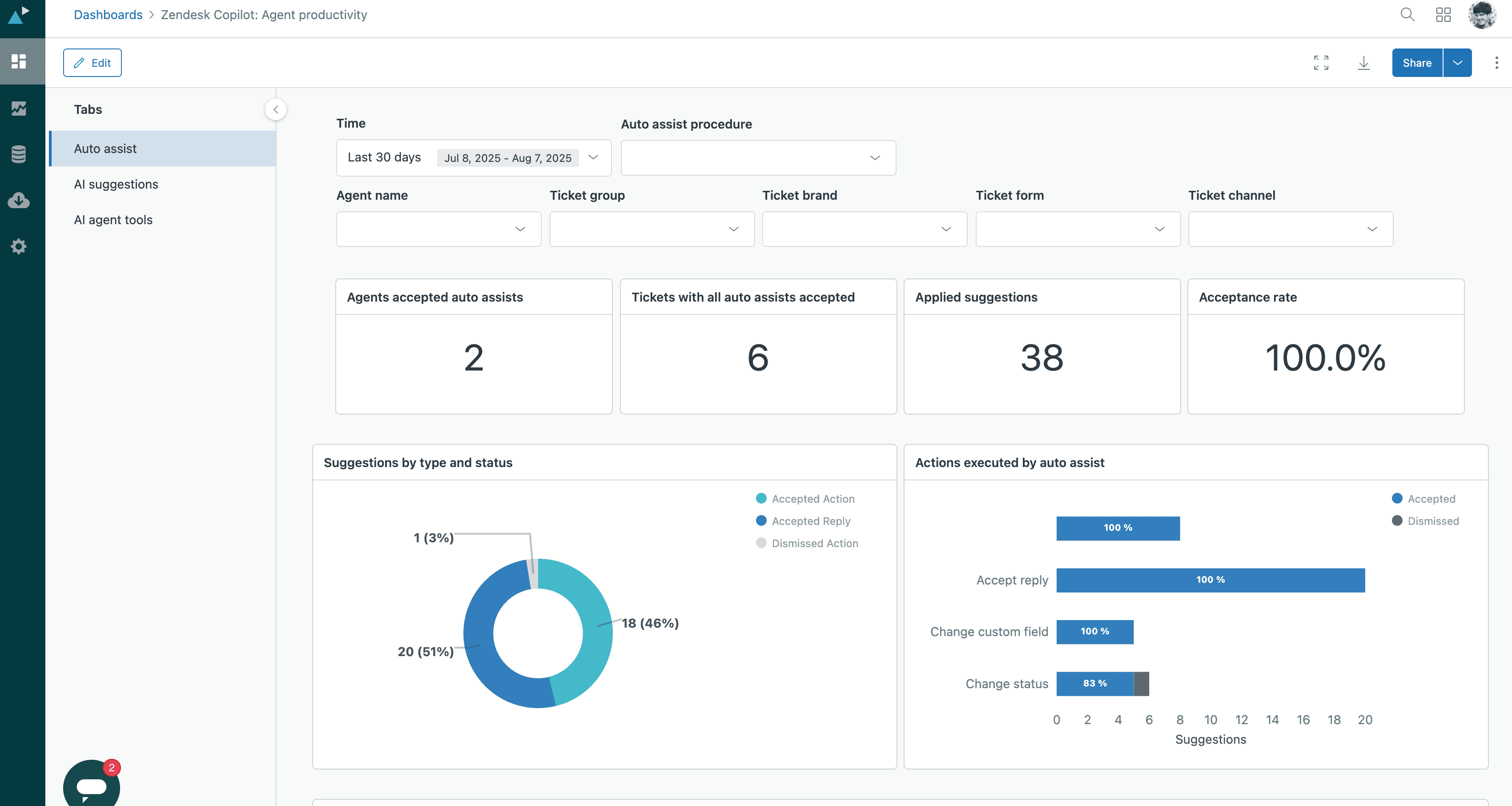
Procedure performance (Auto Assist): The dashboard shows how many tickets each procedure has been applied to and what its acceptance rate is.
Use of AI suggestions: The system measures how agents respond to Agent Copilot’s suggestions. This tracks, for example, the use of similar past resolutions, merge suggestions and macros.
Use of generative writing tools (AI agent tools): The dashboard records data on how often and how agents use AI to polish replies — for example expanding text, changing tone or summarising long threads.
What’s the benefit of analytics? Improving efficiency is based on data, not guesswork. The dashboard tells you directly which procedures work and which need tuning, and how much time the AI tools save your team. That gives you direct visibility into the return on your investment.
What’s included in your base plan and what needs the Copilot add-on?
Not every Agent Copilot feature sits behind the paid add-on. Some come with your plan, but within a capped monthly allowance:
Included in Suite and Support Professional and above: ticket summaries, writing tools and merge suggestions. The allowance is five uses per agent per month, pooled across the whole instance, with a cap of 500 uses per month.
Intelligent triage: the classifications (topic, sentiment and language) are available on Professional plans and above, but using them in workflows, such as routing and triggers, requires the Copilot add-on.
Action flows: building and running them works without the add-on. Auto Assist suggesting or executing them requires the add-on, and run-on-demand execution requires either the add-on or AI agents.
Requires the Copilot add-on: Auto Assist with its procedures, and uncapped use beyond the monthly allowance. Similar tickets joined the free monthly allowance on Suite and Support Professional plans and above as of October 19, 2026.
In practice this means you can try Agent Copilot before you buy it. The allowance is enough for measuring, not for a whole team’s daily use.
How to roll out Zendesk Agent Copilot
At Zennius we recommend approaching a Zendesk Agent Copilot rollout in four steps:
Start with the free allowance (Copilot usage)
The free allowance is already active on Professional plans and above, so your first measurement costs nothing. Watch how often agents accept the summaries and merge suggestions. If you run out of allowance mid-month, you have a concrete case for the add-on. If you don’t, you know it isn’t needed yet.
Build the foundation (Intelligent Triage)
All automation needs good data. Turn on Intelligent Triage first and analyse your team’s top 5 contact reasons. If they can be solved in one go (one-touch), route them to an AI agent. If they need judgement (multi-touch), prepare them for Agent Copilot.
Start piloting (Auto Assist)
Don’t switch Auto Assist on for the whole team or every ticket at once. Pick a test group and create a trigger that adds an agent_copilot_enabled tag only for certain limited situations (or add the tag manually to individual test tickets at first). Start by writing the 1–2 most common and clearest procedures based on your Intelligent Triage data. Once the test group notices they’re saving time and the procedures have been fine-tuned, you can gradually expand to new topics and the whole team.
Monitor and improve
The real game begins after rollout. Track the analytics — such as how often agents actually accept Agent Copilot’s suggestions — and create new procedures based on the accumulated data and the AI’s own recommendations. Little by little, ticket resolution speeds up and more time is freed up for the harder contacts.
Need a hand with the rollout?
If your platform choice is still open, start from the basics: how to choose a customer service platform.
If rolling out Zendesk Copilot is on your agenda, or you’d like a sparring partner to take your support automation to the next level, book a short meeting from our calendar.
Zennius is an AI-expert-certified partner. With experience from over 100 Zendesk AI rollouts, we know these features below the surface and make sure you get the best possible return on your investment.
Frequently asked questions
Partly. On Suite and Support Professional plans and above, a free Copilot usage allowance is included: five uses per agent per month, shared across writing tools, summaries, merge suggestions, and (from October 19, 2026) similar tickets. The allowance is pooled across the whole instance and capped at 500 uses per month. Intelligent triage predictions are visible on the same plans, but using them in workflows requires the Copilot add-on, as do Auto Assist and unlimited usage.
Zendesk AI agents handle a customer interaction from start to finish without a human. They suit high-volume routine requests such as common FAQ questions, order tracking, and password resets. Agent Copilot doesn't talk to the customer at all. It works in the background in the support agent's workspace: it pulls up the information in advance, suggests a reply, and guides the agent step by step through the right process.
Auto Assist provides real-time guidance and automation for the support agent in three ways. It suggests step-by-step procedures (Procedures), carries out system actions with the agent's approval (Actions), such as a refund in Shopify or Stripe, and generates reply suggestions based on Help Center articles and macros. Summaries and writing tools are separate Agent Copilot features.
The benefit of Agent Copilot is measured with Zendesk's built-in Agent Productivity Dashboard. It shows how many tickets each procedure has been applied to and their acceptance rate, how support agents respond to Copilot's recommendations, and how often the generative writing tools are used. The dashboard gives direct visibility into the return on the investment.
Roll out Zendesk Agent Copilot in four steps. Start with the free Copilot usage allowance and measure whether support agents accept the suggestions. Then turn on Intelligent Triage and analyze your team's top five contact reasons. Next, don't switch on Auto Assist for the whole team at once: choose a test group and write the one or two most common procedures. Finally, follow the analytics and create new procedures based on the data.